I. A Paradigm Shift in the AI Era
When people talk about “Vibe Coding,” they’re not talking about a new programming language or framework. They’re talking about AI-driven interactive programming — a fundamentally different way to build software. In this era, code isn’t produced by a developer solo-typing at a keyboard. It’s the result of an ongoing conversation between a human and an AI, exploring and iterating together.
But this paradigm shift has cracked open a deep fissure in traditional Git workflows.
1. The Single Working Directory Problem
Traditional Git was designed around a simple assumption: one repository, one working directory. In an AI-assisted workflow, you routinely need to explore multiple approaches at once, try different implementation paths, and compare alternatives side by side. A single working directory simply doesn’t cut it.
2. Branch Switching Comes at a Cost
Switching branches disrupts things at multiple levels:
- The stash shuffle: You have to stash your changes before switching, but the AI session has no idea those files just got tucked away.
- Commit pressure: You either litter your history with throwaway commits or resist committing entirely.
- Context evaporation: After a switch, all the context the AI session had built up — conversation history, mental model of the project, understanding of trade-offs — is gone. Poof.
3. AI Sessions Have Logical Continuity
Session A → Session B → Session C isn’t just a sequence of command executions. There’s narrative logic flowing through them, and the AI is carrying:
- Conversation history: The full chain of intent, clarifications, and course corrections.
- File state awareness: The AI “knows” the current structure of files, what depends on what.
- Chain of thought: The reasoning accumulated across iterations. AI tools read git history to understand how code evolved, not just what it does.
Switching branches breaks all of that. It’s effectively a brain transplant for the AI. And the worst part: you can’t explore multiple approaches in parallel. In the traditional model, trying three different architectures means going serial: explore A → reset → explore B → reset → explore C. That kind of slow iteration directly contradicts what makes AI-assisted development fast in the first place.
II. Understanding Git Worktree
1. What Is Worktree?
Technically speaking, Git Worktree is a mechanism for spawning multiple working directories off a single .git repository. These directories are independent but connected through shared branch history.
- Shared repository: All worktrees share the same
.gitdirectory — the same commit history, refs, and objects. - Independent working directories: Each worktree has its own filesystem path and can check out a different branch. From
/path/to/ProjectA, you might derive/path/to/ProjectA-fix-bugand/path/to/ProjectA-new-feature. - Branch exclusivity: A given branch can only be checked out in one worktree at a time.
Worktree vs. Clone:
|
|
2. The Worktree Lifecycle
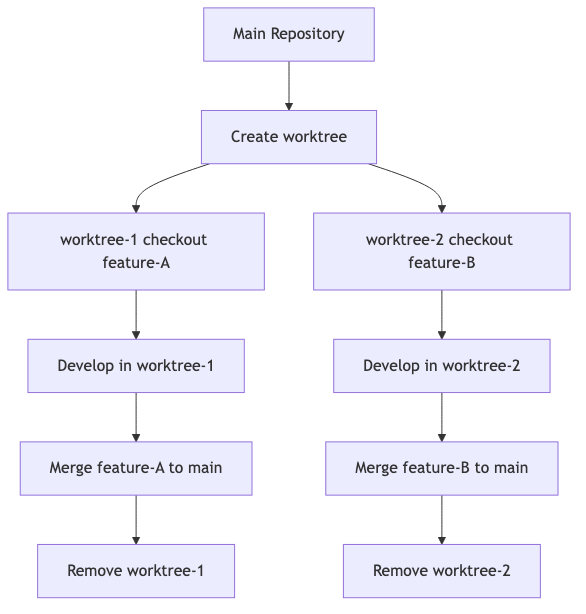
3. Essential Commands
|
|
Useful flags:
-b <branch>: Create a new branch when adding the worktree--detach: Create a detached HEAD worktree (great for throwaway experiments)--lock: Lock a worktree so it can’t be pruned accidentally
Keep worktree names consistent with branch names:
|
|
III. Why Vibe Coding Demands Worktree
1. What AI Sessions Actually Need
Context integrity: An AI session isn’t a single atomic command — it’s a continuous conversation.
- You: “Help me refactor this module.”
- AI: “I’ve analyzed the dependencies. Let me suggest a three-step approach…”
- You: “Step two looks problematic.”
- AI: “Good catch. Let me redesign that part…”
Through that exchange, the AI has built up:
- A structural understanding of your project
- An awareness of your preferences
- Memory of approaches it already tried
Switching branches snaps that thread. The AI has to rebuild its mental model from scratch.
A stable working environment: The AI relies on a consistent set of files. Stash or reset something, and its “cognitive map” goes stale:
- “I remember the API interface in
auth.tsbeing… wait, where did the file go?” → The file was stashed. - “Hold on, didn’t we just modify…?” → The changes got reset. The AI’s “memory” is now wrong.
The freedom to explore: The real power of AI-assisted development is rapid iterative exploration. But exploration needs:
- Experimental changes that don’t bleed into the main branch
- Multiple approaches that can coexist simultaneously
- The ability to throw away dead ends without penalty
A single working directory can’t deliver that. Repeated branch switching is just a recipe for chaos.
2. The Pain Points of Traditional Git
🔴 Pain Point 1: Switching branches = losing your AI context
Scenario: You’re on
developbuilding feature-A with an AI assistant when an urgent bug report comes in.The old way:
- Stash your current changes
- Check out a hotfix branch
- Start a fresh AI session for the bug
- Fix the bug, check out
developagainstash popto recover your workThe problem: Your original AI session is gone. You now have to re-explain the entire design of feature-A from scratch.
🔴 Pain Point 2: AI modifies files = stash hides them from the AI
The AI is midway through editing
config.ts, and you suddenly need to switch branches.You stash the changes and switch. But the AI doesn’t know its files just disappeared:
- AI: “Let me keep editing
config.ts…”- Reality: The file was stashed. The AI is now editing a stale version.
Result: Conflicting edits and merge conflicts the moment you
stash pop.
🔴 Pain Point 3: Exploratory changes = polluting the main branch or constant resets
The AI tries three architecture approaches:
- Approach A: touches 10 files
- Hit a snag. Reset back.
- Approach B: touches 8 files
- Another problem. Reset again.
- Approach C: touches 12 files
Result: The main branch gets hammered with resets, commit history becomes a mess, and fear of committing means you lose the ability to roll back.
🔴 Pain Point 4: No parallelism = serial exploration only
You want to:
- Have AI-1 and AI-2 work on two different frontend styles simultaneously, pick the winner later
- Have AI-3 and AI-4 benchmark different backend algorithms side by side
- Have AI-5 and AI-6 explore different database schemas, trading off query performance against storage costs
Traditional workflow: Serial only. AI-1 explores → reset → AI-2 explores → reset → AI-3 explores. The waste: Three AIs could work in parallel, but you’re forcing them to take turns. That defeats the entire point of AI’s speed.
IV. Putting It Into Practice
1. The Scenario
You need to develop three independent features at the same time:
- Feature-A: User authentication
- Feature-B: Performance optimization
- Fix-C: An urgent bug fix
The old way: Serial development. Finish one, start the next.
The Worktree way:
|
|
2. Naming Conventions and Organization
Naming conventions:
- Feature worktrees:
project-feat-{feature-name} - Experimental worktrees:
project-exp-{approach-name} - Fix worktrees:
project-fix-{issue-number}
Consistent naming makes everything easier to manage at a glance.
Recommended directory layout:
|
|
3. Cleanup and Maintenance
Cleaning up:
|
|
Before deleting a worktree, verify:
- Has the corresponding branch been merged into main?
- Are there any important uncommitted changes?
- Is anything still depending on this worktree — like a running AI session?
V. Closing Thoughts
Git Worktree isn’t just a clever trick — it’s a systemic solution for a fundamentally new way of building software. Traditional Git workflows were born in an era of “one developer, one thread of work.” Vibe Coding is about “multiple AIs working in parallel, exploring fast, staying context-aware.” Worktree bridges that gap.
Once you start using Worktree, you’ll notice the difference:
- Parallel exploration becomes the norm: Multiple AIs working simultaneously, compounding your throughput.
- Experiments don’t pollute your main branch: Try things boldly, discard what doesn’t work, and keep the main repository clean.